

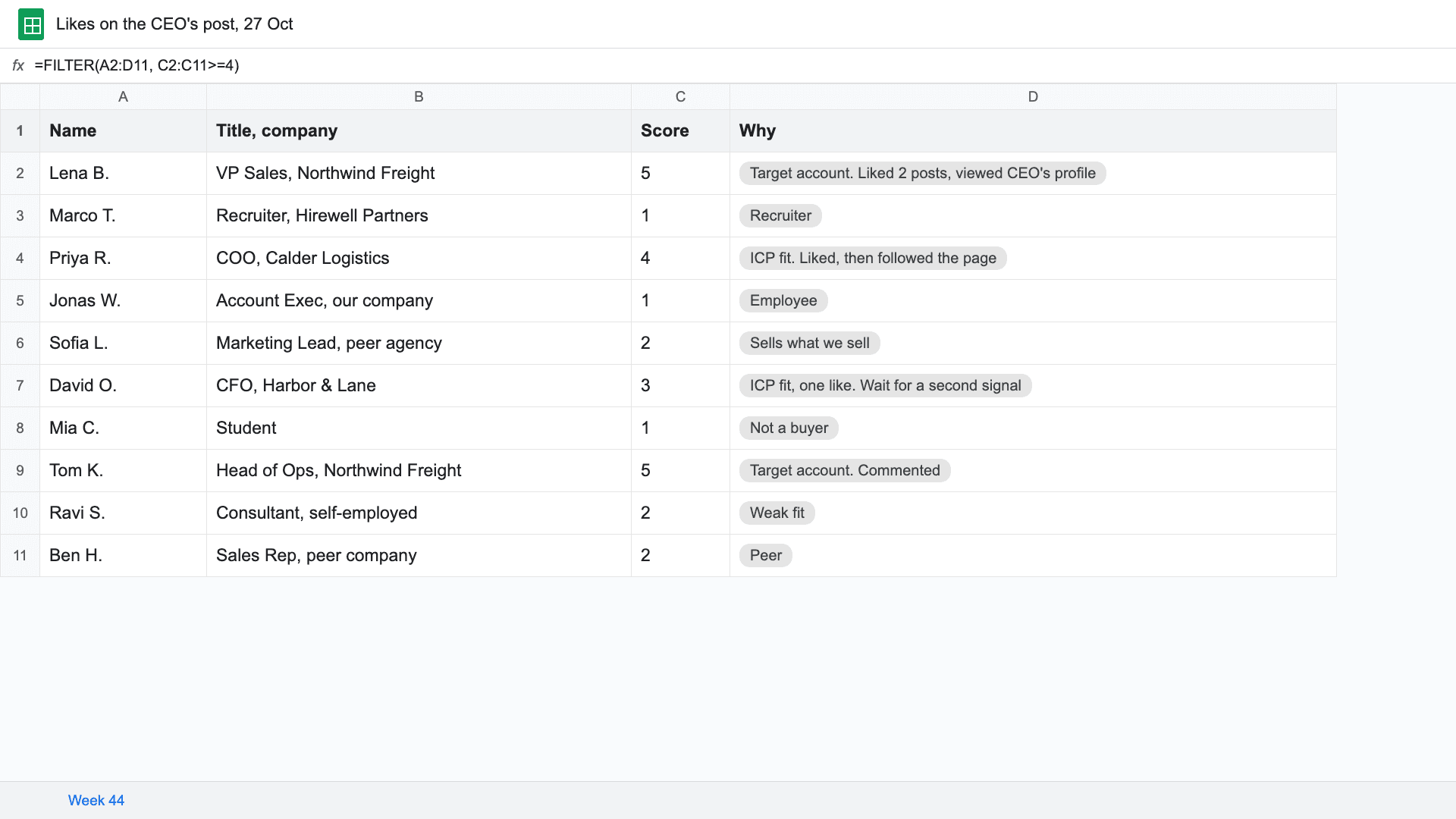
Short answer: Check four things for each person who likes your post. Exclude employees, customers, competitors and recruiters. Then check ICP fit (title, seniority, company size, industry), whether they work at a target account, and whether they engaged more than once or did something stronger than a like. Score them 1 to 5 and send only the 4s and 5s to sales. By hand that's about 20 minutes per post. Teamfluence does it automatically: an AI agent scores each person 1 to 5 against your ICP with a one-line reason, and your target account list counts on its own.
Last updated: 22 October 2026
A commercial lead at a consultancy told us on a call this month what they care about in their team's posts: "If great we've got fifty likes, well ... I'm more interested in the ten or six or seven likes that are our exact match of people that we actually want because that's stuff we can report on."
That's the job. Out of fifty likes, find the handful who match, and do it before the week is over.
This guide covers who usually likes your posts, the four checks, a simple score, how to do it by hand, and the tools that do it for you.
Who usually likes your LinkedIn posts?
Mostly people who already know you. On a typical founder's or exec's post, that means:
- colleagues and your own employees
- peers in your industry, and people who sell the same thing you do
- recruiters
- friends, ex-colleagues and people from old jobs
- people who sell to you
That's normal, and it's why a like count says little about pipeline. Buyers are in the list too. They're just a few names among many, and they often engage quietly: one like, a profile visit, a company page follow.
LinkedIn's own post analytics include "post viewer demographics", kept for 180 days. That describes your audience as a group. To qualify people, you need the names.
What are the 4 checks?
1. Exclusions. Take out anyone you'd never sell to: your employees, current customers (they go to account management, not sales), competitors, recruiters, students. One customer in GTM operations said it on their onboarding call: "we don't want to bring these people in because they're employees."
2. ICP fit. Two halves. The person: title, department, seniority. The company: size, industry, location. A VP Sales at a 40-person company in your industry fits. A VP Sales at a 40,000-person company outside it might not.
3. Target account. If you sell to a named list of accounts, anyone from those companies counts, even if their title isn't the one you'd normally pick. They can still introduce you.
4. Behavior. One like is the weakest signal. A comment, a profile visit, a company page follow or a second like in the same week counts for more. Someone who does two or three of those is paying attention. Our ranking of LinkedIn engagement signals has the full list.
How do you score a liker?
Keep it to 1 to 5, and write one line on why. The line matters more than the number: it's what the rep reads before reaching out.
| Score | Who | Example (fictional) | What happens |
|---|---|---|---|
| 5 | Fits your ICP, at a target account, engaged more than once | Lena B., VP Sales, Northwind Freight. Liked two posts, viewed your CEO's profile | Sales this week |
| 4 | Fits your ICP, engaged more than once | Head of Ops at a company your size, in your industry. Liked, then followed the page | Sales this week |
| 3 | Fits your ICP, one like | Director at a good-fit company, one like | Watch: wait for a second signal |
| 2 | Weak fit | Consultant, self-employed | Ignore for now |
| 1 | Excluded | Recruiter, employee, competitor | Never |
Teamfluence splits the score in two, person and company, each 1 to 5. If the company is on your target account list, the company score is 5 automatically.
How do you qualify likers by hand?
The 20-minute version, for one post:
- Open the post and list everyone who reacted or commented, in a sheet: name, title, company.
- Cross out the exclusions: employees, customers, competitors, recruiters.
- Score the rest 1 to 5 with the table above. Write the one line.
- Check the 3s against last week's sheet. Anyone who shows up twice moves to a 4.
- Send the 4s and 5s to the account owner, with what they did and when.
It works for one person posting once a week. It breaks when five people post. A senior director at an enterprise IT services company described where it ends up: "somebody needs to go manually and do the the qualification for those people." Nobody keeps that up for long.
Ways to qualify LinkedIn post likers, compared
| Whose posts | How it qualifies | Target account list | What you get | Cost | |
|---|---|---|---|---|---|
| By hand in a sheet | Any post you can see | Your judgement, 1 to 5 | By hand | A sheet | About 20 minutes per post |
| Clay table (do it yourself) | Engagers you feed in | Columns you build | You build it | Whatever you set up | Your Clay plan + your time |
| Traxy | Any profiles on your watchlist, plus market discovery | "one engagement qualified against your ICP" (1 credit each) | Not listed | ICP matches; Slack, Meta Ads and "8+ more integrations" | From $149/month |
| Postbeam | Your team's posts and profiles | ICP filters: job title, seniority, company size, industry | Not listed | Export to HubSpot, Salesforce, CSV | $39 per seat/month (2+ seats) |
| Teamfluence | Your whole team plus company page | AI agent scores person and company 1 to 5 with a one-line reason, or by hand | Yes: target accounts score 5 automatically | Qualified people in HubSpot, Salesforce, Slack, webhooks, API, MCP | From $299/month |
"Not listed" means the company's own site doesn't say, as of 22 October 2026. Sources: traxy.ai/pricing, postbeam.ai, teamfluence.com/pricing.
How does Teamfluence qualify the people who like your posts?
Teamfluence collects every like, comment, profile visit, new connection and follow across your team's profiles and your company page in one workspace. Each person is qualified one of three ways:
- Your ideal customer: an AI agent scores each person 1 to 5 against your ICP and writes one line on why.
- Your target accounts: upload the list (or pull it from HubSpot), and anyone from those companies counts.
- By hand: people who don't qualify wait in a review list, and anyone on the team can promote them.
Qualified people go to HubSpot, Salesforce, Slack, a webhook or your AI agent, with what they did and when. That's the opening line for the rep. More on that step in how to push people who engage on LinkedIn into your CRM.
FAQ
Should I message everyone who liked my post? No. Most likes come from people who already know you and won't buy. Message the 4s and 5s, and don't open with "thanks for liking my post". Start with something about them.
Is a like a buying signal? On its own, barely. It becomes one when it comes from someone who fits, at an account you want, and repeats or stacks with a profile visit or a follow.
Should comments count more than likes? Yes. A comment takes effort and says what the person thinks. Read it before you reach out: it often tells you what to say.
What about people who like my coworkers' posts? Count them. A buyer who likes your CEO's post and visits a rep's profile in the same week is one person paying attention to your team, not two weak signals. That's why qualifying works best across the whole team.
How fast should sales follow up? Within a few days. More in the 48-hour rule.
See it on your own posts
If your team posts and you want only the buyers out of every like, scored with a reason: talk to sales and we'll run it on your own team's posts.
Related: LinkedIn engagement signals, ranked · How to see who viewed your sales team's LinkedIn profiles · Best tools to see who engages with your team's LinkedIn posts